Simulation and target details
We have seen how to select a simulation: DTL for example, and we have seen how the system automatically steps through the stands and targets in a layout.
Target repeat
There are easy targets and there are hard targets - the temptation is to practise the targets we can hit!
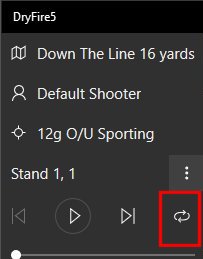
The "repeat" function allows practise on the same target repeatedly - without moving on to the next in the layout.
Click on the "repeat" icon, select the stand/target you want (Skeet 4 high would be a good one!), then click on the start triangle to activate the microphone.
Target sub-menu
Click on the three vertical dots to the right of the target selection area to bring up a sub-menu.
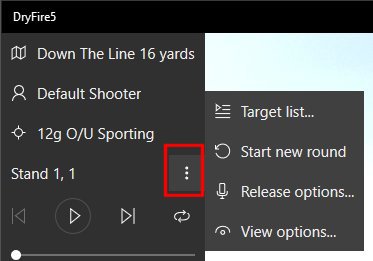
- "Target list" allows you to select a particular stand.
Note: you can also select an individual target by clicking on its box on the score card.
- "Start new round" will clear the score card ready to start a new round
- "Release options" goes directly to the Target release section of system settings - see below
- "View options" allows you to define how the target is displayed - see below.
Target release options
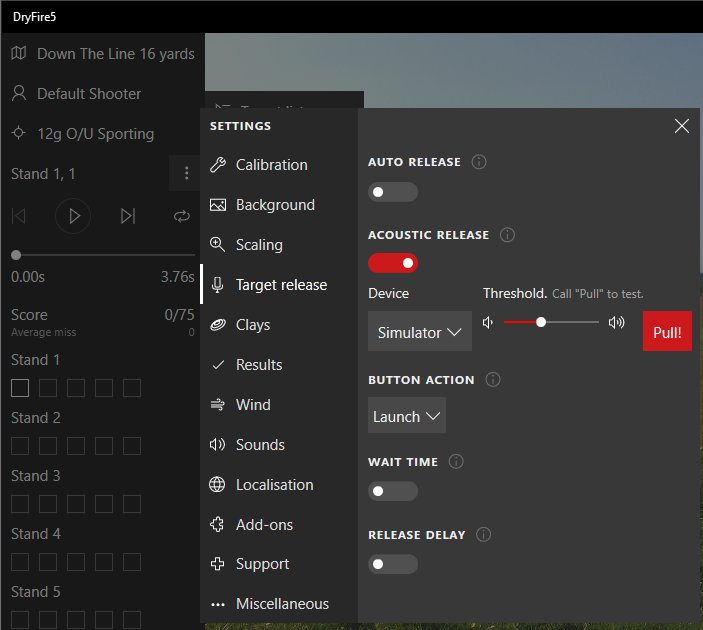
Targets are normally prepared for release when you click on Start. The green microphone image will be displayed and the system will wait for you to call "Pull".
- "Auto release" allows you to work quietly with targets released automatically a specific time (in seconds) after the previous results are displayed.
- "Acoustic release" indicates that you wish targets to be released when you call "Pull".
- "Device" selects either the simulator microphone or the one in your PC/laptop.
You can set the microphone sensitivity by adjusting the threshold slider. Call "Pull" and a red box containing "Pull" will appear if the system hears you.
- "Button action" determines how the keyboard space bar may be used - click on the circle "i" for more details.
- "Wait time" will enforce a delay between targets to allow you to lower your gun and relax.
Don't be tempted to keep the gun mounted to shoot targets as quickly as you can - a 7lb/8lb gun will rapidly become very heavy and your scores will suffer. Relax after each shot - just as you would do outdoors.
- "Release delay" will generate a random delay between after you call "Pull". The random delay will be between zero and a single value you select or between two values you select.
View options
You can preview the clay in flight by dragging the dot in the target timeline (above the score card).
DryFire brings targets to you.
Unlike outdoors, you don't have to physically move from one stand to another - DryFire does that by adjusting the viewing angle to be the same as you would see outdoors.
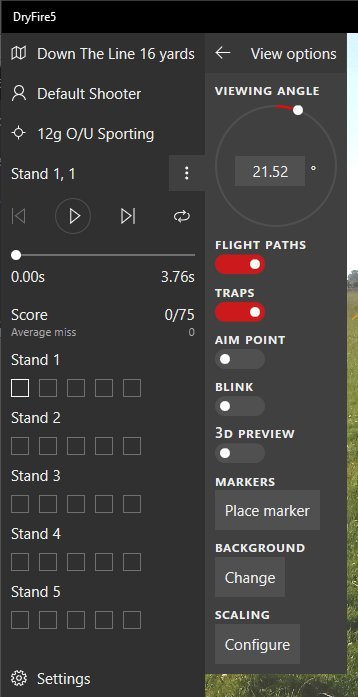
- Every stand in every DryFire simulation has a built-in default viewing angle. The circular "viewing angle" function allows you to adjust this angle if you wish.
Drag the dot round the circle and your viewing angle will change - click on "Reset" to return to the value defined in the simulation.
- "Flight paths" allows you turn on or off the display of clay trajectories on the preview screen.
- "Traps paths" allows you turn on or off the display of any traps on the preview screen.
- "Aim point" will show the correct aiming point (allowing for lead) at any time during the clay's trajectory.
Use your mouse to drag the dot in the target timeline to see the clay and aiming point.
- "Blink" will flash the aiming point (projection only).
- "3D preview" displays a bird's eye view of the simulation showing stands, traps and current clay trajectory.
- "Markers" allows you to put markers on thw display - for whatever reason (hold points perhaps).
- "Background" allows tyu to select a background for the display.
- "Scaling" allows you to set the scale for how clays, traps and text are shown on the display. A larger clay makes things easier to see.